
Support
Here you will find information to help you through various aspects of your journey with the Encounter School of Ministry.
Primary Support
Most of your support (tuition and technical support) will be handled by Encounter School staff in Brighton, MI. Your first course of action if you have issues with your tuition or accessing the dashboard should be to go to the support area at:
https://encounterschool.org/esm-student-support-on-site/
There you will find a knowledgebase with answers to frequently asked questions about student status, course content & materials, tuition & financial aid*, graduation, and application to the school. Search for an answer to your situation. If you cannot find one, please open a support request ticket.
To open a ticket, scroll to the bottom of the page and fill out the form. Enter “DC” for your campus, and please be as specific as possible about your need. The form does not allow for screenshots to be uploaded, so if you are getting some kind of error when trying to access the dashboard, or need to mention an email you received, please describe the error or the specifics of the email so they can have a better idea of how to help you.
*Note – regarding financial aid, there may be limited financial aid provided by the Main Encounter Campus (especially for priests and seminarians, and when available to young adults). When we have the funds available through benefactors, our DC Campus may provide aid to those in need (see below). If you received aid from the DC Campus, seek our support. If you received aid from the Encounter Headquarters and need help, please go to the support site using the link above and submit a support request.
DC Campus Support
The information below is for students of the On-site DC Campus. If you are in need of support, we want to help you out. In most cases, you will need to open up a support ticket as described above. However, if we know your issue, we can do our best to followup for you.
If you have questions related specifically to our DC Campus: questions about the content or schedule of the school, a scholarship or financial aid from the DC Campus, technical issues, please contact the relevant person below.
| Role | Name | Support Issues |
| Director | Mark Gargulinski | Overall campus concerns |
| Business Operations | Lea Gargulinski | Financial (scholarships, etc.) |
| Shepherds (Year 1) | Betsy & John Roeder | Year 1 content, scheduling, practicums, … |
| Shepherds (Year 2) | Theresa & Andre Leyva | Year 2 content, scheduling, ministry projects, … |
| Technical Director | Don James | Technical issues |
Below you’ll find sections on the enrollment process, basic dashboard (Canvas) navigation, how to activate your Canvas dashboard, etc. To see the information for the particular areas, please Click on the tabs below .
Student Dashboards
Each enrolled student will gain access to a student dashboard. It is important that you setup your dashboard and get familiar with it at the start of the school. This is where the videos and notes for each class will be located, allowing you to make up classes you might not have been able to attend.
You can access it from the Encounter website by clicking on the LOGIN button (see screenshot below). Or simply click here: https://learn.encounterschool.org/users/sign_in

Video Tutorial
Please watch the tutorial below to learn how to gain access to your dashboard and to get an overview of what is available to you via the dashboard.
Note: videos for each talk are typically available within 2 days of the class.
Technical Support
If you are having trouble accessing your dashboard, please watch the appropriate video tutorial above. If this is the first time you are trying to access the dashboard, you will need to find an email from noreply@notify.thinkific.com (thinkific.com is the company hosting the dashboards). It will look similar to the image below:
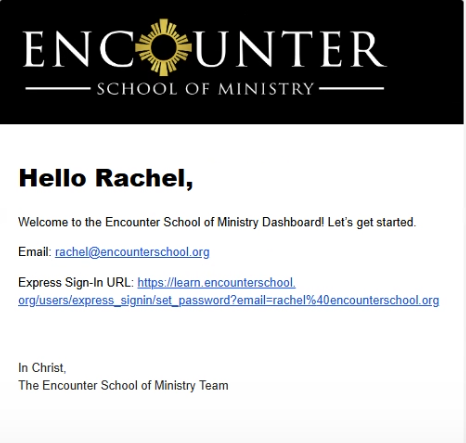
If you cannot find that email, please look in your spam/junk, or trash folder(s). If you still cannot find it, please contact Encounter via the ESM Student Support (Onsite) page… fill out the form at the bottom to open a support ticket, and please be detailed to help them resolve your issue (it may be resending an email).
Once you have that email, click on the Express Sign-in URL link and it will allow you to create your account, setting up a password (please write it down or save it where you’ll remember it).
SAVE THIS EMAIL, it may be helpful in the future if you have trouble accessing the dashboard. The DC Campus can support you in a number of ways,
The DC Campus can support you in a number of ways, but most of your support will come directly from Encounter’s headquarters. The ESM Student Support (Onsite) page isn’t just a way to submit a support request, it also has useful information that will answer most of your questions.
Year 1 Application/Tuition
For those applying for Year One:
If you have guests or friends who would like to register for the School, please let them know that the application deadline is October 1 (this date may change from year to year, check with the team at the start of each year for the application deadline). After that, no applications will be accepted. Once the application period closes, the registration for the year will be finalized and lanyards will be printed and mailed to us.
Sometimes, students have a difficult time finding the emails regarding acceptance or tuition or their invitation to the Canvas dashboard. This can be for many reasons: (a) the email could have gone to their junk/spam or trash folders; (b) they get many emails and they don’t recognize the emails from encounter; (c) there was some difficulty in the sending of the email and it never reached the student. In most cases, we find that the student received the email but somehow never saw it.
If you are having a difficult time finding the emails or knowing your status, it can be helpful to know the process and what the emails look like to help you search for them in your email software.
The Process.
- Potential Student applies to Encounter School of Ministry (ESM)
- A Confirmation Email is sent to the applicant stating the following:
“We have received your application to the Encounter School of Ministry. Your application will be reviewed in the near future and you can expect to receive an email for further instruction by a member of our staff within no less than two weeks. If you have any questions about the application process, please contact us through our Student Support Center at https://encounterschool.org/esm-student-support-home/. - The application is reviewed (this process can take 2-3 weeks, so please be patient). If accepted, the student is added to the ESM Student Dashboard on Canvas.
- The student is sent an acceptance email. The email has the following features (below) that you can use to search for it if you are having difficulty finding it. If you want to see more details about what is included in the acceptance email, you can see an example that was sent in 2025 to the Class of 2027 here: https://encounterschooldc.org/email-acceptance/
- From: Encounter School Admissions <admissions@encounterschool.org.
- Subject: Encounter School of Ministry Acceptance!
- Body: Dear ____,
Congratulations! You have been accepted into the Encunter School of Ministry. After a thorough review of your application, identifying your desire to attend the Encounter School stood out to us… (click here for a full sample of the email)
- The student is sent an invoice by email 24 hours after the acceptance email is sent.
- The student is sent an email to activate and setup their dashboard (see the “Dashboard Problems?” tab above).
Tuition payment
Once the acceptance letter arrives, students have 15 days to pay the invoice. All of the payment information is included in the letter. Students can pay quarterly or get a discount for paying in full. Tuition payments are due on the first day of the Quarter. Obviously, if you are still awaiting your acceptance letter, this date does not apply.
How the tuition portal works:
Once the student is accepted, ESM enables the tuition portal for the student and they are sent an invitation to set-up their tuition account on Zoho. The student should accept the tuition portal invitation so that you can access your account at any time. Best practice: choose to make it match your canvas account (same email & password) which would allow you to easily get to the tuition portal via a link within Canvas. If you setup your tuition portal with a different password than your Canvas account, you’ll simply need to remember two sets of passwords (or have your browser save them).
If a student attempts to log-in without accepting the portal invitation and setting up their account, it would come back with no account found.
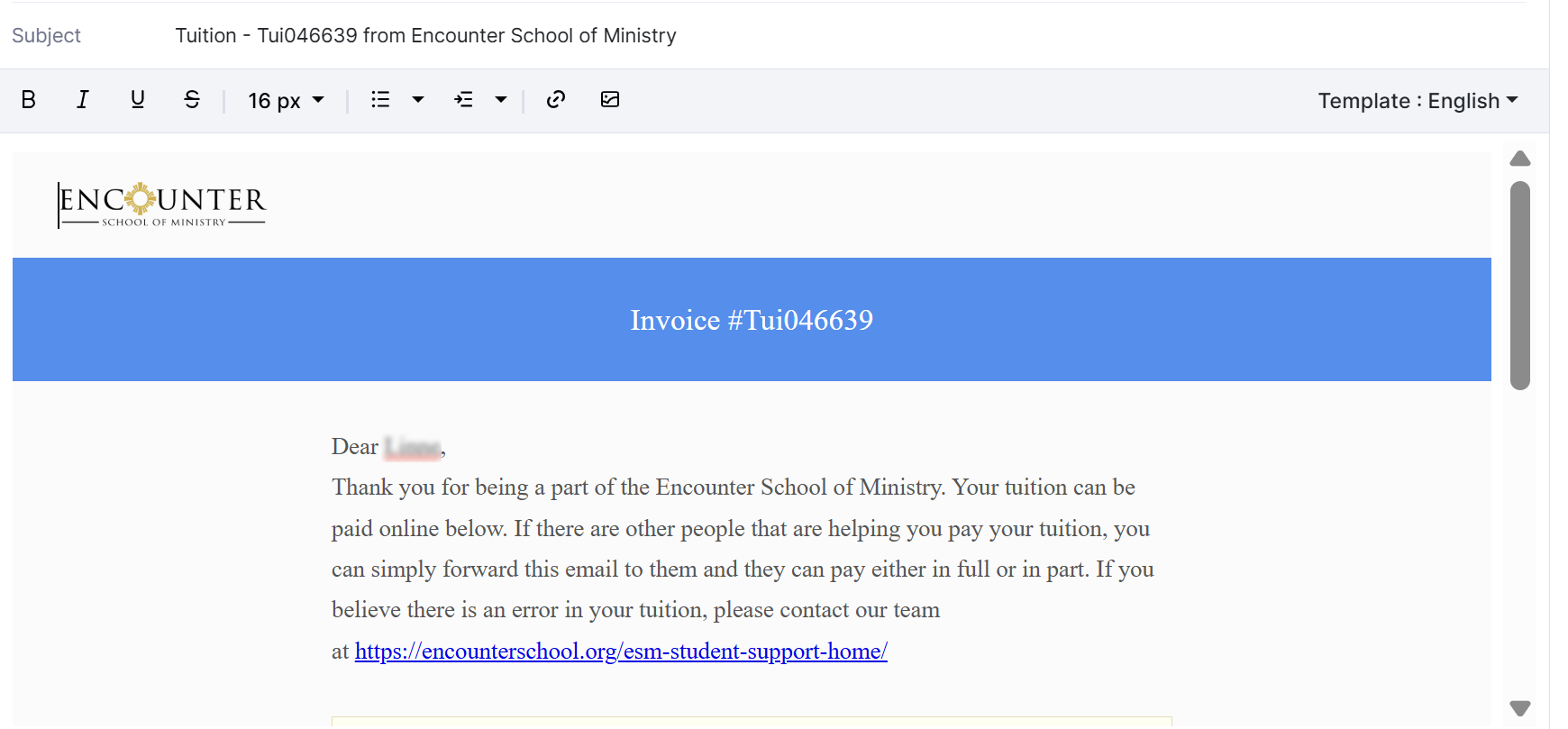
Note from ESM: To make it easier for students, I ALWAYS suggest they skip the tuition portal and look for the invoice that is emailed directly to them. The subject line they should be looking for is: “Tuition Invoice [Invoice #] from Encounter School of Ministry“. The email would look something like this:
For students who have already been accepted and have not yet paid, Brighton sends out payment reminders – please do not ignore these notices. At some point, if payment is not received, they will drop students from the roster. So, if you are having problems in this area, please let us know so that we can assist you.
In the event that a student is dropped and cannot access the student dashboard, they will be able to fill out a Student Reactivation Request Form. This form can also be found on the Student Support Center. Once their invoice is paid, they will be given access to their dashboard once again.
All tuition must be paid online via credit or debit card. Cash or checks are not accepted.
Further Assistance—Open a Ticket at ESM
If you cannot find the emails described above, please contact ESM support directly. All enrollment and tuition issues are handled by the main ESM office. To open a support ticket, please go to: https://encounterschool.org/esm-student-support-on-site/#tuition
Financial Aid through ESM
The Encounter School of Ministry (ESM) offers some limited need-based scholarships for priests, seminsarians, religious, and young adults (18-30).
https://encounterschool.org/tuition/#scholarships
If you need financial aid and fall into one of these categories, you should apply for it when submitting your application to the school (check the financial support option on the ESM application). If you have been accepted and enrolled and received financial aid/scholarship, you will need to contact ESM about any issues related to that aid.
Financial Aid through DC Campus
At times, the DC Campus has been able to offer limited aid through the generous donations of some benefactors. This aid does NOT show up on your tuition statement. Typically, it is provide to you in the form of a rebate AFTER you have paid your tuition. The details and amounts may vary from year to year, but after you pay for your tuition and our campus has received the funds, we will provide you with a check equal to the amount of the rebate you were given.
If you have any questions, please contact our business manager, Lea Gargulinski at leagarg@encounterschooldc.org
Students Going Into Year 2
Hello Rising ESM Year 2 Students!
How wonderful it is to officially call you Year 2 students! What an incredible year it has been being able to witness, no matter if you are near or far, the transformation and breakthrough in your lives. The Lord loves to work in you and through you! As a student who completed ESM Year 1, you are automatically enrolled in Year 2.
Once completed, our team will work to issue your tuition invoice. You only need to fill out the Year 2 Information form if you are intending on continuing onto Year 2. If you are unable to continue, please fill out a ESM Student Drop Request Form.
If you are coming back after having completed Year 1, but had to discontinue for a time, you can request to be reinstated so that you can continue on and complete Year 2. To do this, please fill out this Reactivation Request Form.
TUITION OPTIONS:
Depending on if you choose the annual tuition option or the quarterly tuition option, you will be sent a tuition invoice for either your annual tuition or Quarter 5 invoice. These invoices have begun to be sent out and you should have received them no later than July 3, 2026. If you have not received an invoice in your email as of now, please first check your spam folder, and if it is not located there, please reach out to our support team by responding to this email.
Changing from Annual to Quarterly or Quarterly to Annual
If you would like to change your tuition preference from annual to quarterly or vice versa, please complete the following tuition preference change form. Your current invoices will be deleted and you will be issued new invoices to reflect the requested change. Please note: Changes to your tuition preference can only be made prior to the first quarter / annual tuition due date and before ANY payments are made on your account. The system will not be able to process the change request if you have already paid towards the current invoice.
Click Here For: Tuition Change Preference Form
Scholarships
As a reminder, if you received a financial aid based scholarship for last school year through the Advancing the Kingdom (ATK) Scholarship Fund, the scholarship does not renew for the upcoming year. You would need to submit a new application. While we will certainly try our best to provide scholarships to as many students as possible, since we have a limited amount of funds to offer for scholarships, you are not guaranteed a scholarship by filling out the application.
Who qualifies for being able to apply for an ATK Scholarship?
The following groups are eligible to apply for an ATK financial aid based scholarship:
- Catholic Priests
- Vowed Religious Brothers & Sisters
- Seminarians
- Young Adults Ages 18-30
Is there financial aid available for those who do not fall into the ATK categories?
The DC Campus has a limited amount of funds for financial aid while they last. Please contact Mark or Lea Gargulinski if you need assistance.
Year 2 Preview with Patrick Reis
Year One equipped you with skills and tools to unleash the love of God through the power of the Holy Spirit into your spheres of influence. In your second year, we are going to go even deeper, diving into topic of Intimacy, Advanced Ministry Training, Power Evangelization, and Leadership & Deployment. It is in this year where we want you, through the guide of the Holy Spirit, to go after your Kingdom Dreams. You will learn how to take what you have learned to advance the Kingdom even further than you thought was possible.
Please take a few minutes to watch this video message from Patrick Reis, to gain an even better insight as to what you can expect for Year Two of the Encounter School of Ministry!
Eligibility for Graduation
As a reminder, graduation from the Encounter School of Ministry means that a student has completed academic, attendance, and financial requirements over the course of 2 years (8 quarters). To be eligible for a Certificate of Completion, students must be able to satisfy the following requirements on our Graduation Eligibility and Honor Form:
- Completed 80% homework assignments per quarter
- Attended 80% of classes per quarter*
- Completion of Year Two Ministry Project
- Has paid all outstanding tuition invoices
If you have any questions, please do not hesitate to reach out to Encounter School of Ministry through the Onsite Student Support Center.
Contact Us
Please contact us with any issues you are facing with the DC Encounter Campus website using the contact form below.
- If you have issues with registration or tuition, please contact Encounter Ministries at their Onsite Student Support Portal. Since we do not have access to login credentials, password issues also need to be resolved by Encounter Ministries.
- If you have questions regarding teachings given, homework, upcoming practicums or ministry projects, please contact your class shepherds (Betsy & John Roeder for Year 1, or Theresa & Dr. Andre Leyva for Year 2)
If you’ve had a problem that was resolved by Encounter Ministries, please let us know so that we can be aware of any problems students are having and what was done to fix it. Thank you!